 moshpit
Run your first session.
Connect
Section titled “Connect”Tap the connection card on the home screen. The first connection to any host raises a New Host sheet with the key fingerprint and the command to verify it on the server. Check it if you can; tap Trust to continue, Cancel to abort. Moshpit remembers the answer per host, and warns loudly if that key ever changes later.
Read the top bar
Section titled “Read the top bar”Left to right: back, the transport pill (SSH or MOSH, which turns amber while roaming), then the breadcrumb. Each breadcrumb segment is a button that opens the matching picker:
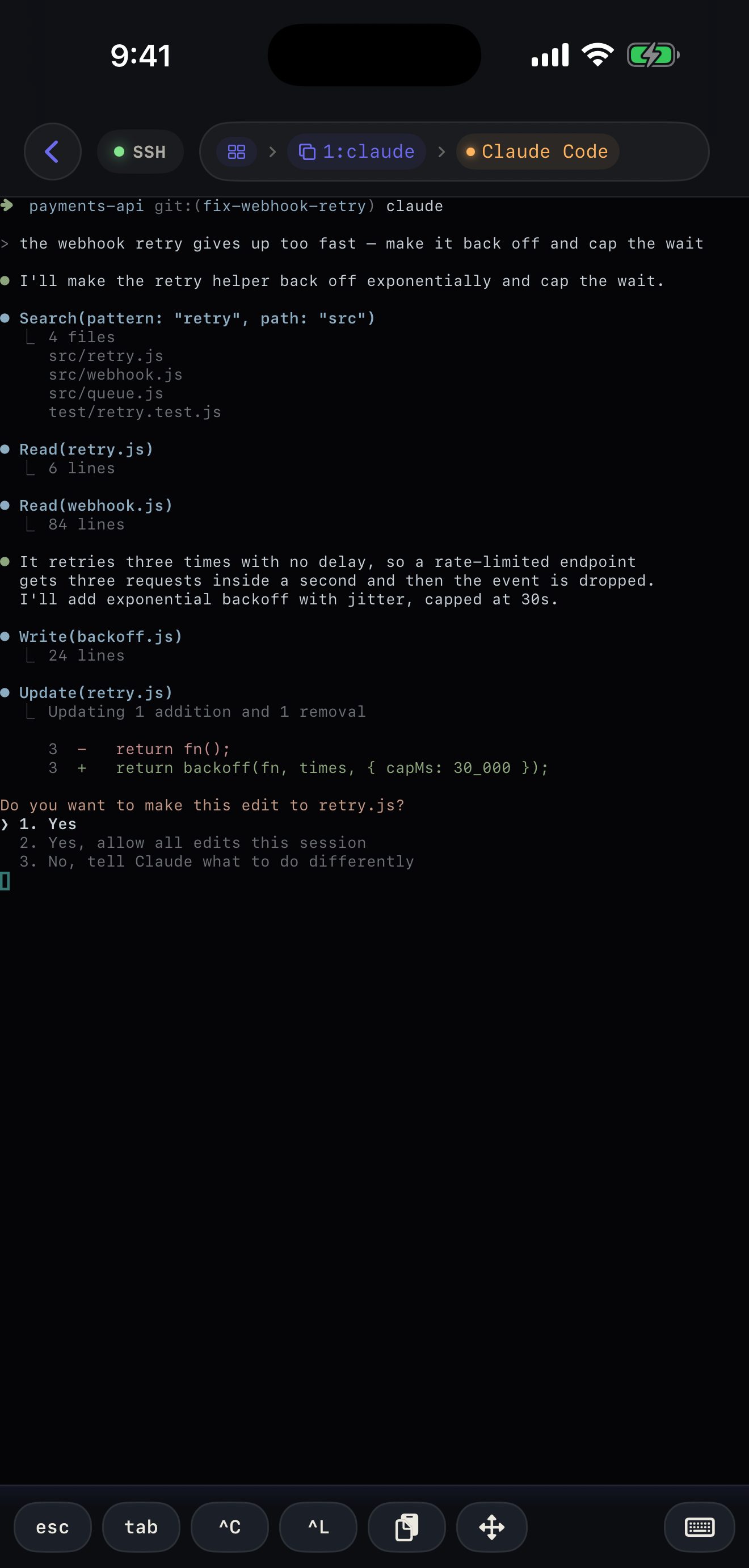
- First segment — sessions on tmux, workspaces on herdr.
- Second segment — windows on tmux, tabs on herdr.
- Third segment — the pane. When an agent lives there it shows the agent’s name and a state dot instead, and turns amber when that agent wants you.
Without a multiplexer there is no tree to show, so the bar shows the connection identity instead.
Tap the terminal to raise the keyboard. Above it sits the shortcut bar: esc, tab, ^C, ^L, paste and a D-pad by default — all of it replaceable, see Keyboard and shortcuts. A hardware keyboard works too, with the usual control chords going straight through.
Once the terminal has the keyboard, a tap puts the cursor where you tapped — the tap goes out as the click that a mouse-aware program (Claude Code’s prompt, vim, less) reads as “cursor goes here”, so a character in the middle of a long prompt is one tap rather than a run of arrow keys. A plain shell gets nothing, because a shell would print the click into its command line instead of acting on it.
Move around
Section titled “Move around”- Switch windows or panes — tap the matching breadcrumb segment and pick from the sheet. On tmux you can also swipe horizontally across the terminal.
- Scroll — swipe vertically. Moshpit decides whether that becomes real scrollback or a wheel event for a full-screen app; see Scrolling and scrollback.
- Create, rename or close — the + in each sheet creates; long-press a row for rename and close.
Leave and come back
Section titled “Leave and come back”Go back to the home screen and the session stays live: the card shows LIVE with an uptime. Moshpit reconnects on its own after sleep, airplane mode or a dropped tunnel, and puts you back on the pane you were on.
What does not survive is the app being suspended for a long time in the background — iOS stops the connection, and agent state stops updating until you return. Tap Disconnect in the card when you actually want it gone.
If you run agents, Run Claude Code from your iPhone is the walkthrough worth doing next. If something already looks wrong, Troubleshooting is written symptom first.