 moshpit
Mosh and roaming
Mosh is optional. Moshpit is a plain SSH client without it, and every feature except roaming works the same. What mosh adds is a session that does not die when your phone changes networks — and one structural cost, stated up front: over mosh, tmux and herdr paint their own full-screen TUI instead of Moshpit rendering them natively. The native sheets still work, fed by a second SSH connection alongside — but the terminal itself is whatever the multiplexer paints. That is not a bug awaiting a fix; the reason is further down this page.
It roams
Section titled “It roams”When iOS reports a better network path — Wi-Fi coming up, cellular taking over — Moshpit marks the session roaming and immediately pushes a packet down the new path so the server re-homes to your new address.
Nothing renegotiates. Mosh’s State Synchronization Protocol is connectionless: the client keeps its own state numbers, so there is no handshake to redo. The roaming flag clears the moment an authenticated reply lands.
It survives sleep
Section titled “It survives sleep”Coming back to the app, if the UDP connection went into a failed or waiting state while iOS held the socket, Moshpit restarts it and flushes at once so the server re-homes.
An SSH session gets a full reconnect after a long suspension. A mosh session takes its own resume path instead, because SSP usually heals itself. What it does not do is keep running while you are away — see the last section.
It tolerates loss
Section titled “It tolerates loss”A screen diff is applied only when its old_num matches the state Moshpit already holds, so the ANSI composes correctly. On a gap, Moshpit acks its true state and lets the server re-diff rather than applying a broken one.
A one-second heartbeat keeps NAT mappings warm and acks flowing.
Moshpit does not shell out to the mosh binary and does not bundle mosh’s C++. It is a from-scratch client for the same wire protocol.
Implementation
Clean-room, checked against the RFC
Section titled “Clean-room, checked against the RFC”The transport is Swift over Apple’s Network framework. Crypto is AES-128-OCB3 — the AEAD_AES_128_OCB_TAGLEN128 parameter set from RFC 7253 — and the test suite runs the RFC’s own Appendix A vectors, including its tampered-tag rejection case.
- Written from the published protocol description, not translated from mosh’s GPL-3.0 C++. The full disclaimer is in the repo’s
NOTICES.md - zlib framing hand-rolled over Apple’s raw-DEFLATE, to match what mosh-server expects
- Datagrams fragment at 1300 bytes
- “mosh” is Keith Winstein’s project; the name identifies the protocol being spoken, nothing more
One deliberate difference from stock mosh
Section titled “One deliberate difference from stock mosh”Un-acked keystrokes stop retransmitting after 10 seconds. Upstream mosh retransmits forever, which is the right call for a blip and the wrong one across a link that is properly dead: keys you typed into a frozen screen otherwise replay into the shell minutes later, and a command you already retyped after reconnecting runs a second time.
Resize events are exempt — they are idempotent state, not actions. Expired states drain as empty diffs so the state numbering survives, because the server tracks the input stream by number.
Moshpit probes the host before it spends a round trip. A missing mosh-server never produces a raw command not found — it degrades instead.
If it isn’t there, you still get a terminal
Section titled “If it isn’t there, you still get a terminal”Moshpit reuses the SSH session it already authenticated, connects you as a plain shell, and raises a dismissible banner:
⚠ mosh-server not found — connected over SSH instead. Install mosh ×The home-screen card for that connection also turns its MOSH pill grey with a warning triangle, so the card is not claiming roaming it does not have. Your multiplexer survives the fallback: with tmux the SSH session still boots tmux -CC, and with herdr you get the native frame channel — the same full-width single pane you would have had over plain SSH. Losing mosh costs you roaming, not multiplexing.
Install Assist
Section titled “Install Assist”Tapping Install mosh opens a sheet with the command for whichever package manager the probe found:
sudo apt-get install -y mosh # Debian, Ubuntusudo dnf install -y mosh # Fedorasudo yum install -y mosh # older RHEL / CentOSsudo pacman -S --noconfirm mosh # Archsudo apk add mosh # Alpinebrew install mosh # macOSThree actions, no fourth. Run in terminal pastes the command into the visible shell and presses return, so the sudo prompt and all the output are yours to watch. Copy command hands it over. Re-check re-runs the probe. Moshpit never installs anything silently. If the connection also uses tmux, it offers tmux mosh in one command. If the probe found no package manager at all there is no command to offer, so the sheet says so and leaves you with generic guidance and the same Re-check button.
Reconnecting re-runs the capability probe, so a dependency you install later is picked up on the next connect without touching any settings.
The Homebrew trap
Section titled “The Homebrew trap”ssh host command runs a non-login, non-interactive shell. It does not source .zprofile or .bash_profile, so anything brew shellenv added to your PATH is invisible over that channel — the exact binary that works fine when you log in by hand probes as missing.
Moshpit prepends the same directories to both the probe and the launch:
/opt/homebrew/bin /opt/homebrew/sbin /usr/local/bin /usr/local/sbin $HOME/.local/binIf that still isn’t enough, put an explicit path in the connection form’s mosh-server path field — under ROAMING · MOSH, not the Settings row called Server binary, which the connect path never reads (see the settings section). An explicit path means you have vouched for it: Moshpit uses it verbatim, adds no PATH prefix, and skips the missing-binary check entirely for that connection.
Three things — and the third one catches most people connecting to a box on their own LAN.
Port 22, or your SSH port
Section titled “Port 22, or your SSH port”TCP. Mosh cannot bootstrap without a successful SSH login to the same host. There is no mosh-only mode.
60000–61000, both ways
Section titled “60000–61000, both ways”UDP. Inbound to the server, outbound from the phone. mosh-server binds one port in the range per session.
Local Network permission
Section titled “Local Network permission”iOS. Only for LAN hosts. Deny it and iOS silently drops UDP to 192.168.x.x — SSH connects, mosh black-screens. Internet hosts are unaffected.
The exact command Moshpit runs
Section titled “The exact command Moshpit runs”PATH="$PATH:/opt/homebrew/bin:/opt/homebrew/sbin:/usr/local/bin:/usr/local/sbin:$HOME/.local/bin" \ mosh-server new -s -c 256 -p 60000:61000 -l LANG=en_US.UTF-8new -s binds the UDP socket to the server-side IP of the SSH connection, so the datagrams take the same path your SSH login just took. -c 256 asks for 256 colours. The server prints one line and forks into the background:
MOSH CONNECT 60001 <22 base64 chars = a 16-byte AES-128 key>Moshpit reads that line, closes the SSH connection, and the rendering after it is all UDP. That is why blocking SSH after connect does not kill the picture on a mosh session — and why blocking UDP does. One caveat: if the connection uses tmux or herdr, Moshpit opens a second SSH connection for the control plane, and that one does need TCP for as long as the session lives.
A bad range degrades rather than erroring
Section titled “A bad range degrades rather than erroring”- Start port unusable (non-positive, or above 65535) →
-pis dropped entirely and mosh-server falls back to its own default range - End port unusable → the start becomes a single-port pin,
-p 60000 -p start:endonly when the end is genuinely greater than the start
The editor validates 1–65535 and From ≤ To before it will save.
Global defaults live in Settings → MOSH · ROAMING. Per-connection settings live in the Add/Edit Connection form, under ROAMING · MOSH. Four rows in that pair are stored and never read; they are named here rather than left for you to discover.
Settings → Mosh · Roaming
Four rows, in the order you’ll need them
Section titled “Four rows, in the order you’ll need them”The group’s own footer says it plainly: “Mosh runs over UDP and survives IP changes. If your server is behind a strict firewall, open the port range above outbound from your iPhone.”
- Turning Mosh by default off makes new hosts plain SSH; existing connections keep whatever they were saved with
- The connection’s own
mosh-server pathis the only path Moshpit actually runs. Leave it empty and it runs baremosh-server - The port range shown in the connection form mirrors Settings and is read-only there — it is copied into the connection when you save the form, so changing the global range does not reach connections you saved earlier until you open and save them again
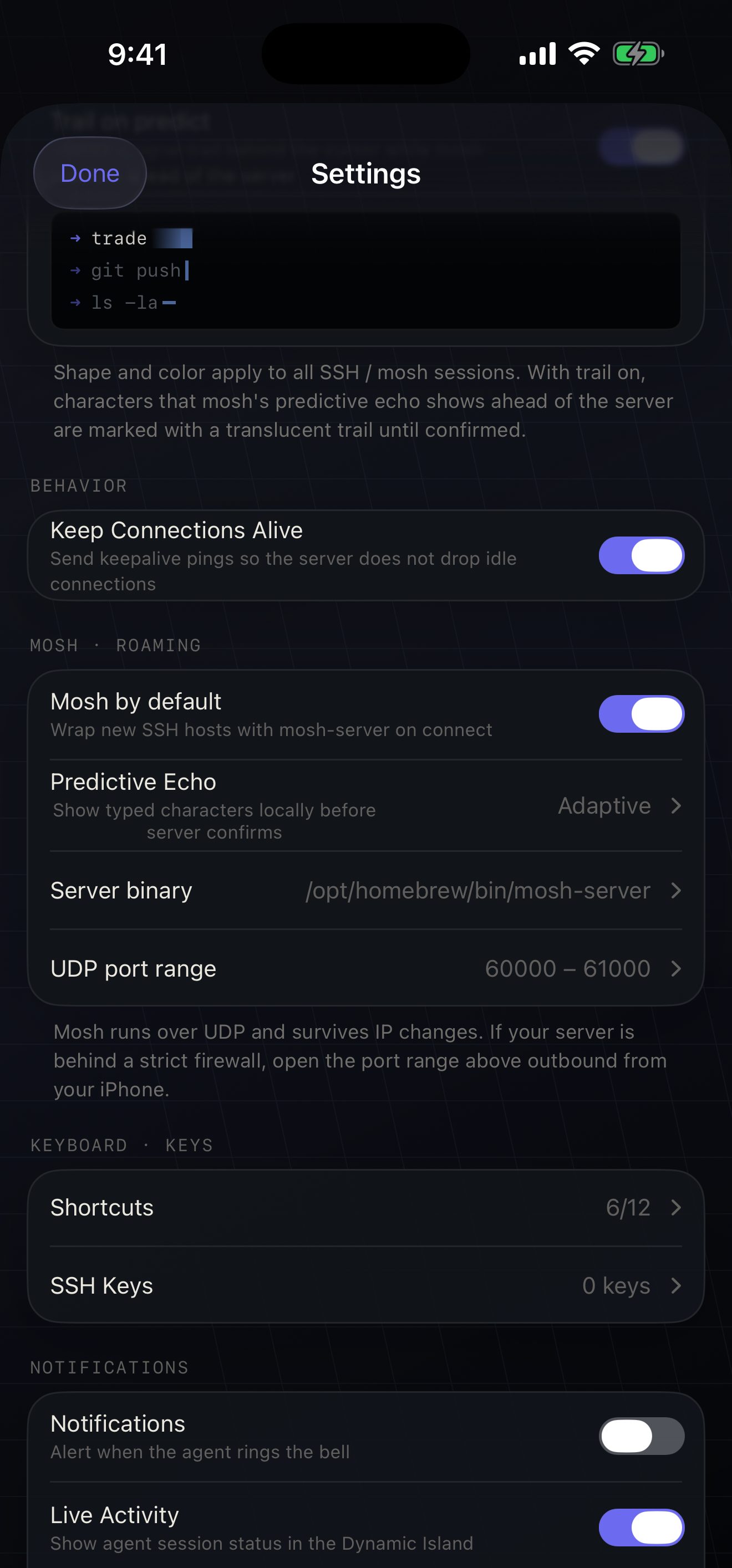
| Setting | Where | Default | Effect |
|---|---|---|---|
| Mosh by default | Settings | On | Wraps new SSH hosts with mosh-server on connect |
| Server binary | Settings | /opt/homebrew/bin/mosh-server |
Stored. Not read on connect — see below |
| UDP port range | Settings | 60000 – 61000 | From / To, copied into a connection when you save its form, then forwarded as -p. 1–65535, From ≤ To |
| Use Mosh | Connection form | Follows the default | Per-host protocol. Also switchable live from the transport pill |
mosh-server path |
Connection form | Empty | The path Moshpit actually launches. Empty means bare mosh-server on PATH — more portable than an absolute path |
| Predictive Echo · Predict Mode | Both | Adaptive | Stored. Not acted on — see below |
| Trail on predict | Settings → Cursor | On | Stored. Not acted on — see below |
| Roam on Cellular | Connection form | On | Stored. Not acted on — roaming happens either way |
Settings → Server binary is not wired up
Section titled “Settings → Server binary is not wired up”The row exists, the editor saves, and the connect path never looks at it. Launching mosh reads exactly one path: the connection’s own mosh-server path, and bare mosh-server when that is empty. So the stored default of /opt/homebrew/bin/mosh-server is not what your Linux hosts are running — they are running whatever mosh-server resolves to on the extended PATH above, which is the behaviour you want. If you need to point at a specific binary, use the connection form’s field, not this one.
Predictive echo is not implemented
Section titled “Predictive echo is not implemented”The picker is real, the choice persists, and in the current build it changes nothing. There is no local prediction engine in the transport: Moshpit renders only bytes the server sent. The protocol’s echo-acknowledgement field is skipped unread, the mode never reaches the UDP transport, and nothing about it appears on the remote command line. Trail on predict is in the same position — it drives a preview swatch in Settings and nothing else. The “Predict ON” chip in the roam banner is a fixed label, not a state readout.
On a high-latency link you see your keystrokes when the server echoes them, exactly as you would over SSH.
Roam on Cellular is stored and never read either. Roaming is not opt-in: it is driven by the system telling Moshpit a better network path exists, and it happens whether that toggle is on or off. We would rather write this down than have you file a bug about it.
Mosh transmits rendered screen diffs, not a raw byte pipe. Line-framed control protocols do not survive that. Verified empirically: tmux -CC starts server-side over mosh and no %begin or %output ever comes back. The same reasoning applies to herdr’s frame protocol.
Over SSH
Section titled “Over SSH”native rendering
- tmux — control mode: Sessions, Windows and Pane sheets as real lists
- herdr — the frame protocol: one full-width pane, native workspace and tab lists
- Breadcrumb, swipe-to-switch and every sheet come from the same control plane
Over mosh
Section titled “Over mosh”its own full-screen UI
- tmux — the plain attach TUI inside the mosh shell, driven by Ctrl-b, roaming along with mosh
- herdr — herdr’s own TUI. Moshpit is the renderer
- A second, lightweight SSH connection feeds the native sheets: rendering over UDP, control over TCP
Moshpit tells you this before you connect, not after. The connection form’s footer ends with it in one line: “With Mosh, herdr runs its own terminal UI; native rendering needs SSH.” One thing to carry over from that TUI: herdr’s prefix is also Ctrl-b, but the bindings under it are not tmux’s — Ctrl-b q lists panes in tmux and detaches in herdr. Moshpit’s own sheets print each multiplexer’s real keys; your muscle memory does not get that check.
What the dual transport means in practice
Section titled “What the dual transport means in practice”- mosh + tmux is two connections at once. If SSH is blocked but UDP works, the control sidecar cannot come up — Moshpit falls back to typing
tmux attachinto the mosh shell. You get tmux; you do not get the native sheets. - Both control planes ride SSH, which iOS kills in the background. On resume the mosh render path heals itself, and the
-CCsidecar or herdr poller is rebuilt. - The tmux window is pinned to your phone’s grid through the sidecar, because a mosh renderer cannot size the window itself. Without that pin its 80×24 PTY strands the TUI at 80×24 in the top half of the screen.
- Scrollback is the exception to that rule. The sidecar’s copy-mode does not repaint the separate mosh client, so a swipe has to travel over the mosh channel itself. If the pane holds a program that grabbed the mouse — Claude Code, vim, less — it gets a scroll-wheel event forwarded and scrolls itself. A plain shell gets copy-mode keystrokes instead, at page granularity.
- The mosh + tmux bootstrap can take up to about 15 seconds — a second SSH handshake, then polling — and the attach loop waits up to 6 seconds for the control plane to land on a session.
- Moshpit never creates a tmux session for you. If the sidecar is alive but your tmux server has no sessions, it leaves the mosh shell alone and waits for you to create the first one.
The socket reaches ready, your keystrokes reach the server, and zero reply datagrams ever come back. Black screen, live cursor, no error. It is almost always a VPN, proxy or firewall on the network you are on right now, passing outbound UDP and dropping the inbound.
Moshpit notices, on purpose
Section titled “Moshpit notices, on purpose”Once the connection is ready and flushing, a watchdog arms with an 8-second deadline. It is deliberately generous: the first reply arrives one round trip after the first flush, so even a link with multi-second latency answers well inside it. Only a link that returns nothing runs it out.
The watchdog retires the instant any datagram lands — including one that fails to decrypt or fails to parse — so a working-but-slow link never trips it. And it only ever arms before the first datagram: a mid-session stall is a different problem, usually recoverable through roaming, and is left alone.
When it fires, an amber banner appears at the top of the terminal:
⚠  Mosh isn't receiving data — your network may be   blocking UDP (VPN, proxy, or firewall).
   Switch to SSH                                    ×
The banner never blocks the terminal. Keystrokes still reach the server; only the rendering is starved. Switch to SSH flips the connection’s protocol, saves it, and reconnects over TCP — which works through the same path that ate your UDP. The × dismisses the banner and leaves the mosh session exactly as it was.
You can make the same switch yourself at any time: tap the MOSH pill in the top bar and confirm “Switch to SSH?” Reconnecting re-runs the capability probe, so nothing stays stuck in a degraded state.
Reading the counters
Section titled “Reading the counters”Long-press the transport pill on a mosh session for MOSH DIAGNOSTICS — four numbers meant to be screenshotted and sent, not admired:
datagrams Total UDP datagrams received, counted before decrypt or parse. A low number behind a “connected” pill points at the network or NAT, not at the app.
applied Highest display state actually applied. Stuck at 0 while datagrams climbs means every diff so far hit the gap or parse-failure branch — the server has content queued that has never been accepted.
parse fails Diffs that arrived and did not decode. A high count means something about this host’s output isn’t parsing.
gaps Diffs received out of order. A few are expected on a lossy link; a count that keeps climbing while applied never moves means the client is stuck re-diffing.
“No datagrams yet.” This is the tell. Nothing has arrived at all — that is the dead return path, not a rendering bug. Stop debugging Moshpit and start debugging the network.
That overlay exists because the failure needs real packet loss, real reordering, or one specific remote shell configuration to reproduce — none of which loopback testing produces. A screenshot of it is the only practical diagnostic for a session nobody can otherwise inspect.
Work through this before filing anything
Section titled “Work through this before filing anything”- Try cellular. If it works on 5G and not on Wi-Fi, the Wi-Fi network is the answer, not the app.
- Turn the phone’s VPN off and reconnect. Split-tunnel VPN profiles are the single most common cause.
- LAN host? Check Settings → Moshpit → Local Network on the phone. Denied, iOS drops UDP to 192.168.x.x and 10.x.x.x on the floor and tells nobody.
- Check the cloud firewall or security group — is the UDP range open inbound, and is it the same range Moshpit is configured for?
- Run
moshfrom a laptop on the same network. If that black-screens too, it is not Moshpit.
Do I need mosh at all?
No. Moshpit is a normal SSH client without it. Turn Mosh by default off in Settings, or leave Use Mosh off on a given connection. Everything except roaming behaves identically, and native rendering of tmux and herdr only happens over SSH — so on a stable network SSH is the better trade.
Does mosh replace SSH?
No. Mosh cannot bootstrap without a successful SSH login to the same host: SSH is what starts mosh-server and carries the session key back. Moshpit then closes the SSH connection and runs on UDP. Keep TCP 22 (or your SSH port) reachable.
Why is my terminal stuck at 80×24 over mosh + tmux?
That is the sidecar failing to come up. The mosh renderer cannot resize a tmux window itself, so the pin comes from the -CC control connection over SSH. If SSH is blocked, you get tmux at its default PTY size. Use SSH for that host, or open SSH alongside UDP.
Is this real mosh, or a lookalike?
It speaks the real protocol to a real, unmodified mosh-server — but the client is an independent clean-room Swift implementation of the State Synchronization Protocol, written from the published description rather than derived from mosh’s GPL-3.0 C++. The crypto is verified against RFC 7253’s own test vectors.
Can I use mosh with herdr?
Yes, and it roams. But herdr runs its own TUI inside the mosh shell, and the native workspace and tab sheets are fed by a separate SSH connection polling herdr api snapshot — every 2 seconds while something is changing, easing to 8 seconds once the tree stops moving. herdr’s CLI exposes no event subscription, so that poll is the ceiling on how fresh the sheets and the agent status can be. On herdr 0.7.3 the pane objects carry no command, so the pane breadcrumb reads pane 1 rather than the program’s name; 0.8.0 added the field.
If you want herdr rendered natively, connect over SSH instead. One thing to know before you do: herdr’s direct attach is exclusive per pane, so a second client on the same pane evicts the first. Two Moshpits pointed at one pane will take it from each other until one of them backs off, which Moshpit does after three evictions in 30 seconds, showing “Another client is using this pane — retrying shortly.” herdr’s own TUI does not hold the attach, so a terminal running plain herdr on your laptop is not a competitor.
Why did my typing appear minutes later on an old session?
It shouldn’t now. Un-acked keystrokes expire after 10 seconds instead of retransmitting forever, precisely so a link that comes back after a long death doesn’t replay a queue of stale input into your shell. If you still see it, that’s a bug worth reporting.