Features / Notifications
The agent asks. Your phone knows.
An agent stops for permission and waits. If you are not at the desk, it waits for nothing. Moshpit sends the question to your Lock Screen, and one tap takes you to the pane that asked.
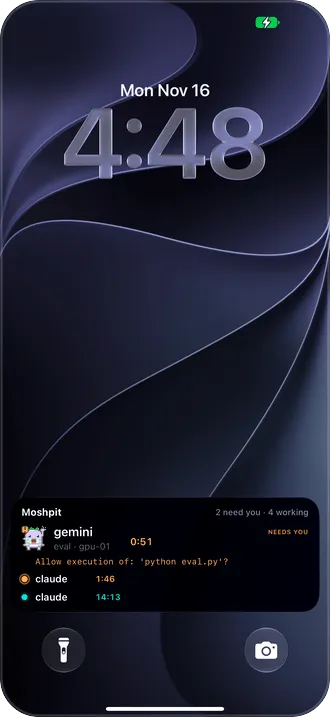
Why it’s there
Encrypted on your host
The host seals each push with a key paired to your phone. The relay and Apple carry ciphertext; only the phone opens it. It arrives even with the app closed.
Lands on the pane that asked
Tap the notification and you are in that pane, on that host, with the question on screen. No hunting through sessions.
Seven agents
Claude Code, Codex, Gemini CLI, Qwen Code, Qoder, Factory (droid) and CodeBuddy, in tmux, in herdr or in a plain shell.
Quiet on purpose
- A question has to stand for 30 seconds before the phone hears about it. Answered at the desk means never announced.
- A finished turn says how long it ran, and what the agent answered when the host has jq. Three minutes or more chimes; a shorter one arrives silently.
- Turn Moshpit’s notifications off and your hosts stop sending them too.
Good to know
- Pushes come from small scripts that Set up a host adds to each agent’s hooks, once, after asking. Codex also wants its four entries trusted with /hooks.
- There is no Allow button on the notification. You read the question in the pane, then answer it.
- Codex asks through its permission requests; Gemini CLI asks only when a tool needs permission.
More features
Home and Live Activity
Who is waiting, who is working, and for how long.
tmux and herdr
See every pane. Swipe between them.
Files
Open the file your agent just made.
Agent tasks
A new task, on its own branch, from your phone.
Mosh
Walk out of the Wi-Fi. The session stays.
Terminal
A terminal first.
Voice input
Talk to your agent. The audio stays on the phone.
Jump host
Jump hosts, the way ssh ‑J does it.
Privacy and source
Paid once. Nothing collected. Source open.
Companion