Features / Home and Live Activity
Who is waiting, who is working, and for how long.
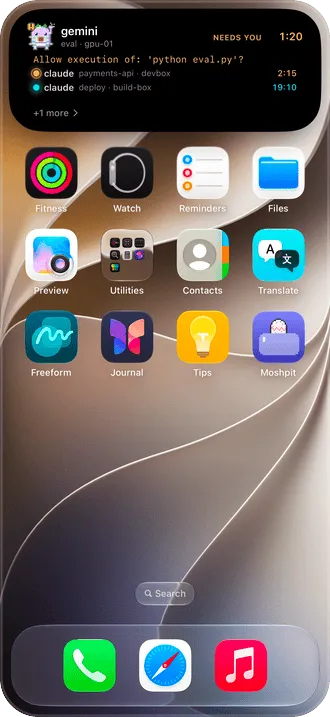
Three agents on two machines, each in its own pane. Moshpit puts all of them on one screen, sorted by who needs you, and keeps the count on the Lock Screen and the Dynamic Island.
Why it’s there
Needs you first
Home starts with every agent waiting on you, across all your hosts. Below it, who is working and for how long, then who is idle.
Without opening the app
The Live Activity on the Lock Screen and the Dynamic Island show who is waiting, who is working, and the timers.
State as data, not a guess
Each agent reports its own state through its hooks, or herdr reports it. Moshpit doesn’t read the screen to guess.
How it works
- On herdr, the state is there with no setup at all.
- On tmux, Set up a host installs the hooks for the agents it finds on the host, and each pane is stamped with its agent’s state.
- Give each host an emoji, or keep the face drawn from its host key, so you can tell the cards apart at a glance.
Good to know
- The Dynamic Island updates live while Moshpit runs; after iOS suspends it, the push covers the gap.
- If the tmux server goes away, Home stops showing its sessions and agents as alive.
More features
Notifications
The agent asks. Your phone knows.
tmux and herdr
See every pane. Swipe between them.
Files
Open the file your agent just made.
Agent tasks
A new task, on its own branch, from your phone.
Mosh
Walk out of the Wi-Fi. The session stays.
Terminal
A terminal first.
Voice input
Talk to your agent. The audio stays on the phone.
Jump host
Jump hosts, the way ssh ‑J does it.
Privacy and source
Paid once. Nothing collected. Source open.
Companion